Zulip vs. Slack
Organized team chat that respects your focus, your history, and your data.
Organized team chat that respects your focus, your history, and your data.
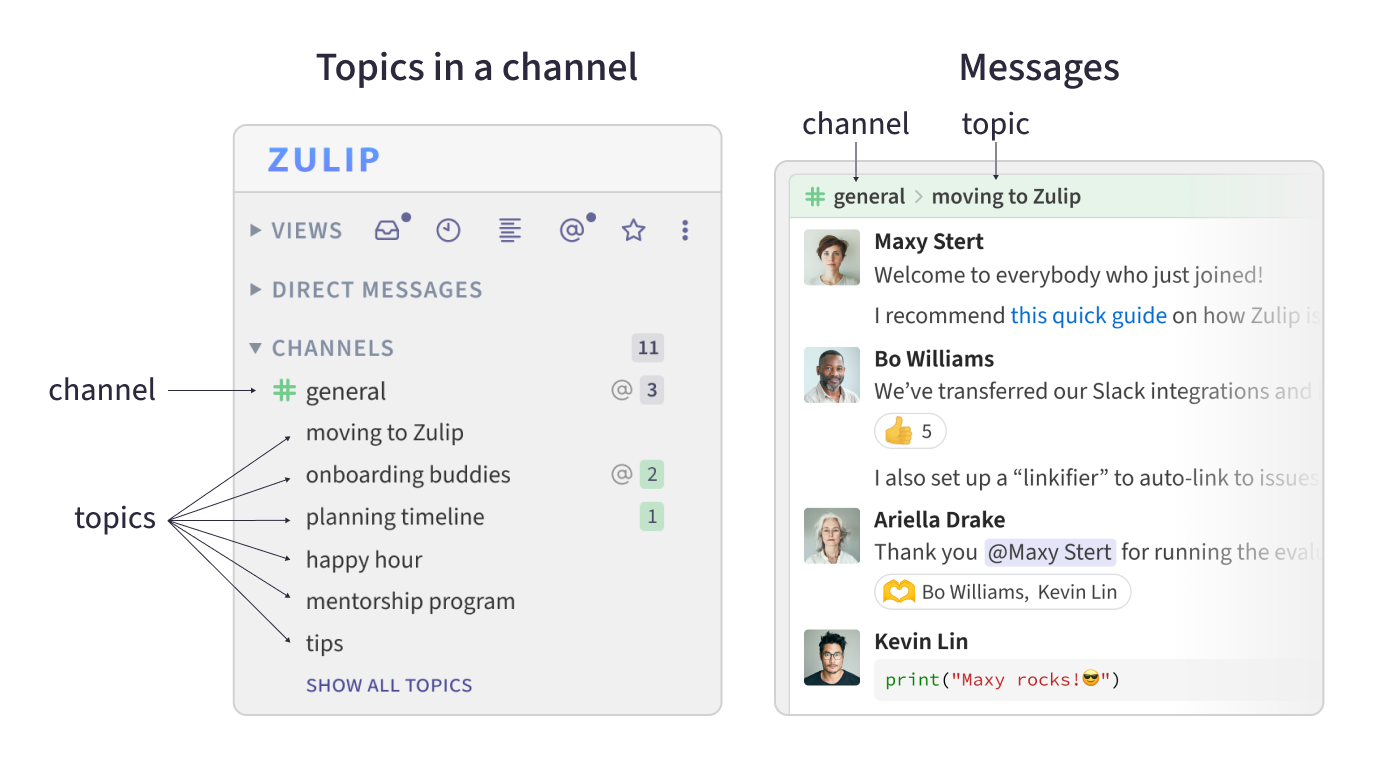
Slack made team chat mainstream, and it's great for quick, real-time back-and-forth. Zulip takes the same building blocks — channels, direct messages, emoji, integrations — and adds one thing Slack doesn't have: every conversation is organized under a topic.
That one difference changes how a team reads, replies, and remembers. Here are the differences that matter when choosing between the two, and, in fairness, what Slack does better.
| Zulip | Slack | |
|---|---|---|
| Daily experience | ||
| Conversations organized by topic | Yes | NoThreads hidden in a side panel |
| Catch up on conversations, not channels | Yes | LimitedPer-channel unread counts |
| Reply in context, days later | Yes | LimitedReply sinks to the bottom of the channel |
| Built-in video calls | LimitedVia Zoom, Jitsi, BigBlueButton | YesHuddles |
| Cost, control, and lock-in | ||
| Message history on the free plan | Limited10,000 messages on Zulip Cloud; unlimited self-hosted | No90 days |
| 100% open-source software | Yes | No |
| Self-hosting | Yes | No |
| SAML, guest users, retention policies | YesFree when self-hosted | Paid plans |
Looking for the full feature matrix? See all Zulip features.
In Slack, a channel is one long stream of messages. Several discussions happen at once, replies land wherever the cursor is, and threads exist mostly to get a conversation out of the way — tucked into a side panel you have to remember to check.
In Zulip, every conversation in a channel is labeled with a topic, like the subject line of an email. You read one conversation at a time, with each message in context, no matter how many other discussions are going on in the channel. If a conversation drifts, it's easy to move messages, rename a topic, or mark it ✓ resolved.
In fact now it seems strange to me to just fire off messages in Slack with no subject – that's chaos, madness. The genius of subject lines is that you can quickly and easily catch up on the messages you missed in your off-hours... This feature alone saves me hours a week.
Slack's unread badges tell you how many messages you missed, not which ones matter. Catching up after a meeting or a day off means scrolling through every busy channel, and the more channels you're in, the worse it gets.
Zulip's inbox shows you the conversations with unread messages. Read the ones you care about, and skim or skip the rest. A busy channel works just fine, so there's no need to create a new channel (and later forget to check it) just to keep a discussion from getting lost.
Slack's interface was too slow and clunky, and the more channels you're in, the harder it is to use. Zulip's UI makes it easy to access all the information you need.
— Jon Jensen, CTO of End Point Dev (case study)
If you weren't online when a discussion happened in Slack, your reply to yesterday's message shows up at the bottom of the channel, far from the context it belongs to. In practice, people who were away often just don't weigh in.
In Zulip, you can pick up a conversation hours or days later. Your reply appears in context, and the topic pops back into everyone's inbox. Leaders and experts can contribute on their own schedule, without a barrage of @-mentions. Silent mentions and followed topics let you tune notifications to just what needs your attention.
Zulip's unique threading saves me well over an hour a day in working with our distributed team of engineers and PMs across 7+ time zones. We tried Slack, Mattermost, and other team chat products that claim to support threading, and nothing handles synchronous and asynchronous communication so intuitively.
— Jacinda Shelly, CTO of Doctor on Demand
Slack's free plan hides messages older than 90 days. On paid plans the history is there, but finding an old decision means sifting through unrelated chatter.
With conversations organized by topic, Zulip's history becomes a knowledge base. Review past decisions, link to a conversation from docs and issue trackers, and find what you need with full-text search. Zulip Cloud Free keeps 10,000 messages searchable; paid plans and self-hosted Zulip have no limit.
Coupled with a culture of using Zulip in an organized way, it's difficult to overstate the impact it has on knowledge management... It is the essence of good UX design.
— Max McCrea, co-founder of Monadical
Slack is proprietary software that you rent, with your data on Slack's servers. Zulip is 100% open source, with no "open core" catch: the same software powers Zulip Cloud and self-hosted installations.
You can self-host Zulip behind your firewall for complete control, or use Zulip Cloud and move any time with high-quality export and import tools. Zulip has by far the most active open-source development community of any team chat software.
Zulip Cloud Standard is $6.67 per user per month billed annually ($8 monthly), and Zulip Cloud Plus is $10 ($12 monthly). Free and discounted plans are available for open-source projects, education, research, and non-profits.
When you self-host, features that Slack reserves for its top-tier plans — SAML and LDAP authentication, guest users, granular permissions, and data retention policies — are included at no cost.
We'd rather you choose Zulip with open eyes. A few things Slack does that Zulip doesn't, or does differently:
Can we bring our Slack history with us? Yes. Import your Slack workspace, including message history, users, channels, and custom emoji, into Zulip Cloud or your own server.
Do we have to self-host to use Zulip? No. Zulip Cloud is a fully managed service. Self-hosting is an option, not a requirement, and you can move between the two.
What happens to our Slack integrations? Point them at Zulip's Slack-compatible incoming webhook, then switch to native integrations over time.
How is this different from Slack threads? Slack threads are optional side conversations attached to a message. Zulip topics are how every conversation is organized, so nothing is hidden and there's always an obvious place to reply. Read more.
Can we try it before switching? Yes. Explore the Zulip development community without an account, or create a free organization in minutes.