Zulip vs. Slack

Slack was built for chatter. Zulip was built for getting work done.

Will my team actually work better?

What am I committing to?

Slack made team chat mainstream, and it works well for quick, real-time back-and-forth. But as teams grow, the same design that makes Slack feel lively — busy channels, constant notifications, threads tucked away in a side panel — makes it hard to follow what matters and easy to miss what's important. Zulip keeps the channels, the emoji, and the integrations, and adds one thing: every conversation is organized under a topic.

Zulip is everything Slack is, but it's smarter and more powerful.

Threads that organize, instead of hide

  • In Slack, a conversation either piles up in the main channel, or disappears into a thread you have to remember to check.
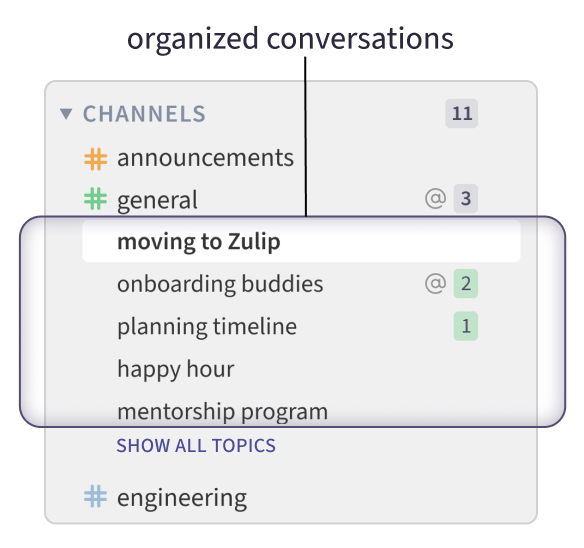
  • In Zulip, every conversation in a channel is labeled with a topic, like the subject line of an email. Topics show up in your inbox, your sidebar, and your search results.
  • Read one conversation at a time, with each message in context — no matter how many other discussions are happening in the channel.
  • It's always clear where to reply, and it's easy to move messages if a conversation drifts.
In fact now it seems strange to me to just fire off messages in Slack with no subject – that's chaos, madness. The genius of subject lines is that you can quickly and easily catch up on the messages you missed in your off-hours... This feature alone saves me hours a week.
Catch up in minutes, not hours

  • Slack's unread badges tell you how many messages you missed, not which ones matter. Catching up means scrolling through every channel.
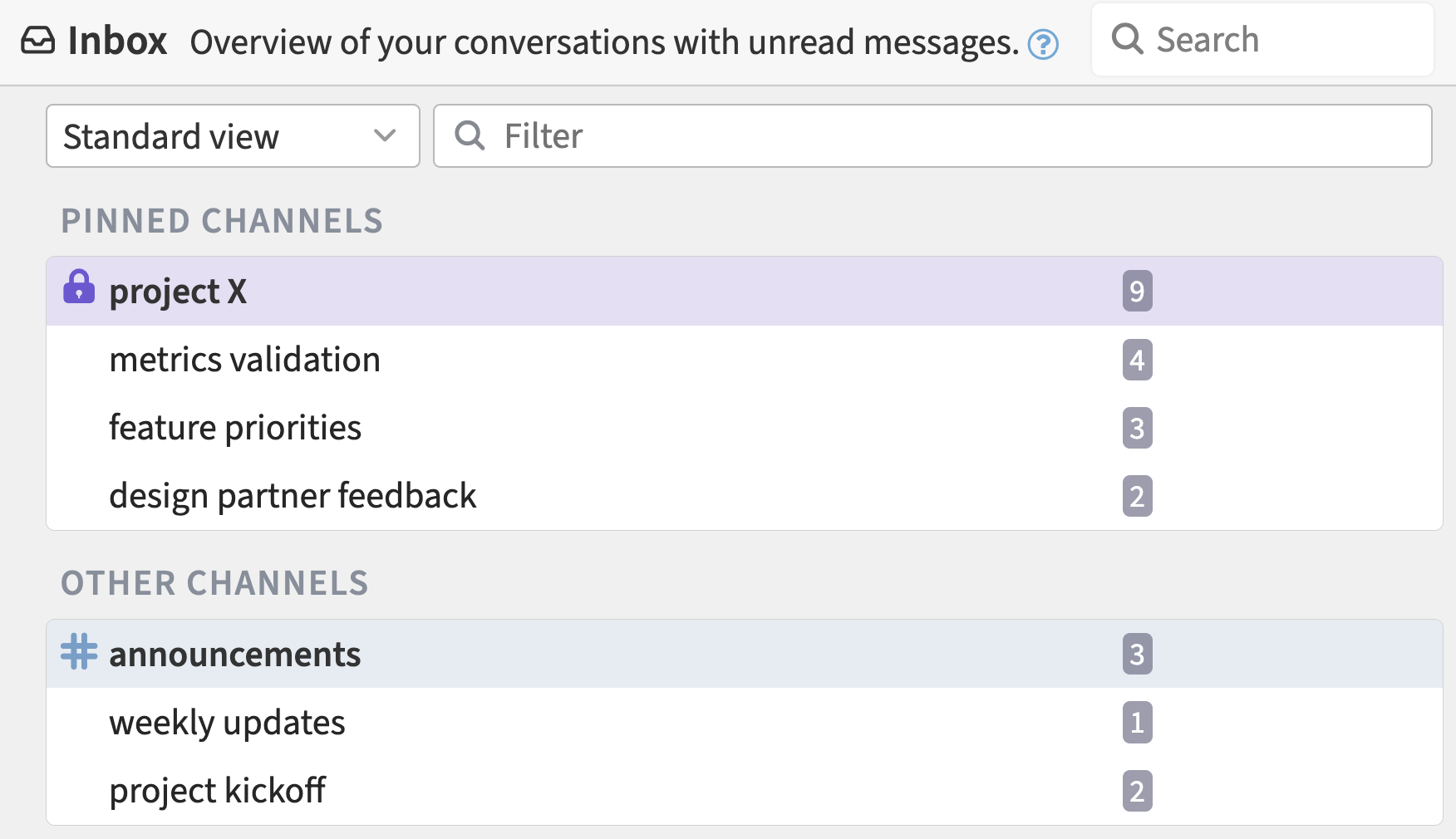
  • Zulip's inbox shows you the conversations with unread messages, so you can read the ones you care about and skim or skip the rest.
  • Busy channels work great in Zulip. There's no need to create a new channel (and later forget to check it) just to keep a discussion from getting lost.
  • Mark a topic ✓ resolved when the work is done.
Slack's interface was too slow and clunky, and the more channels you're in, the harder it is to use. Zulip's UI makes it easy to access all the information you need.
— Jon Jensen, CTO of End Point Dev (case study)

Work asynchronously, without interruptions

  • In Slack, if you weren't online when a discussion happened, your perspective is often never heard. Replying to an older message pushes it to the bottom of a busy channel.
  • In Zulip, you can pick up a conversation hours or days later. Your reply appears in context, and the topic pops back into everyone's inbox.
  • Leaders and experts can weigh in when they have time, without a barrage of @-mentions clamoring for their attention.
  • Silent mentions and followed topics let you tune notifications to just what needs your attention.
Zulip's unique threading saves me well over an hour a day in working with our distributed team of engineers and PMs across 7+ time zones. We tried Slack, Mattermost, and other team chat products that claim to support threading, and nothing handles synchronous and asynchronous communication so intuitively.
— Jacinda Shelly, CTO, Doctor on Demand

Chat history you can actually use

  • Slack's free plan hides messages older than 90 days, and even on paid plans, finding an old discussion means sifting through unrelated chatter.
  • With conversations organized by topic, your Zulip history becomes a knowledge base: review past decisions, and find what you need with full-text search.
  • Link to a Zulip conversation from emails, docs, issue trackers, code comments, or anywhere else.
  • Topic autocomplete lets you know when your question has been discussed before, and you can rename, move, or split topics to keep things tidy.
Coupled with a culture of using Zulip in an organized way, it's difficult to overstate the impact it has on knowledge management... It is the essence of good UX design.

— Max McCrea, co-founder of Monadical (blog post)

100% open source. Your data, your choice.

  • Slack is proprietary software you can only rent. Zulip is 100% open-source, with no "open core" catch: the same software powers Zulip Cloud and self-hosted installations.
  • Self-host Zulip behind your firewall for complete control over your data, or use Zulip Cloud and move any time with our high-quality export and import tools.
  • Enterprise features like SAML authentication, LDAP sync, and advanced permissions are free when you self-host.
  • Zulip has by far the most active open-source development community of any team chat software, and is sustainably funded to serve you for years to come.

Moving from Slack is easy

We switched to Zulip after trying pretty much every chat app out there. And it's been amazing. The threading-by-topic system is genius. It keeps every conversation in its lane and makes catching up effortless.

— Deepak Shukla, Founder and CEO of Pearl Lemon

Feature comparison

Zulip offers the same 100% open-source software in the cloud and self-hosted. See plans and pricing for details on what's included in each Zulip plan.

Feature Zulip Slack
Organized conversations
Topic-based threading
Threads hidden in a side panel
Read one conversation at a time
Inbox of conversations with unread messages
Unread counts per channel
Mark conversations as resolved
Move messages between conversations and channels
Permanent links to messages and conversations
Message history
Message history on the free plan
10,000 messages on Zulip Cloud Free; unlimited when self-hosted
90 days
Full-text search
Complete data exports
All plans
Full exports only on top-tier plans
Efficient communication
Code blocks with syntax highlighting
250+ languages
No syntax highlighting
LaTeX
Built-in polls and to-do lists
Via third-party apps
Emoji reactions and custom emoji
Voice and video calls
Zoom, Jitsi, BigBlueButton, Google Meet
Huddles
Extensive keyboard shortcuts
Schedule messages and reminders
Silent mentions
Apps and integrations
Web, desktop, and mobile apps
Terminal app
Integrations with other apps
130+ native, 1000s via Zapier and IFTTT
REST API and bot framework
Slack-compatible incoming webhook
Ownership and control
100% open-source software
Self-hosting option
Move your data between cloud and self-hosted
Import your Slack workspace
Administration
Guest users
All plans
Paid plans
SAML single sign-on
Zulip Cloud Plus; free when self-hosted
Business+ plan
Permissions by role, group, and individual user
Limited
Granular data retention policies
Paid plans
Number of supported languages 23 13

Make the move today

Getting started is easy! Import your existing Slack workspace, or create a new organization in minutes. Read how End Point Dev, Semsee, and GUT contact made the switch.

If you have any questions, please contact us at sales@zulip.com. You can also drop by our friendly development community at chat.zulip.org to ask for help or suggest improvements!

I don't like going back to Slack now. It's just not as efficient a way to organize communication.
— James van Lommel, Director of Engineering at Semsee

Zulip plans and pricing

You can move freely between Zulip Cloud hosting and your own servers with our high quality export and import tools.

Zulip Cloud

Simple managed solution.
Always up to date.

Free

Standard

$6.67

/user/month billed annually or $8 billed monthly

Upgrade to Standard

Plus 10 users minimum

$10

/user/month billed annually
or $12 billed monthly

Upgrade to Plus

Self-hosted

Retain full control over your data.
100% open-source software.

Free

Register now for unlimited notifications: grassroots communities · open-source projects · academic research · small non-profits · non-profit events · families & friends

Basic

85+% discount for non-workplace users!
$3.50

/user/month billed monthly

$20/month off for the first year!
Log in to upgrade

Business 25 users minimum

$6.67

/user/month billed annually or $8 billed monthly

$20/month off for the first year!
Log in to upgrade

Enterprise